

Decision records
Find any decision by its id and read, or file, exactly how the model reached it. Written for counsel, compliance and audit.
#In short
- One decision, one record. Look a decision up by the id your own systems gave it, such as an application or claim number.
- Plain sentences, from stored numbers. The outcome and the rule behind it, each input's effect, what would have changed the outcome, and how all of it was computed.
- A document you can file. The same record as a PDF, with a fingerprint on every page that ties the copy to what Kaimei holds.
Not legal advice A record states what Kaimei stored and computed. It can support a compliance process; it does not make a decision, a notice or a filing compliant, and it is not legal advice.
#Finding a decision
In the dashboard, open Decisions under Compliance and type the decision's id. Part of an id narrows the list; the whole id opens its record. A decision appears there once its prediction is logged, and the id is the one it was logged under: your own, or the one Kaimei generated when none was sent. Each model's own page has them too, under Decisions in its Compliance tab: that model's decisions alone, and how many of them have been explained.
#What a record says
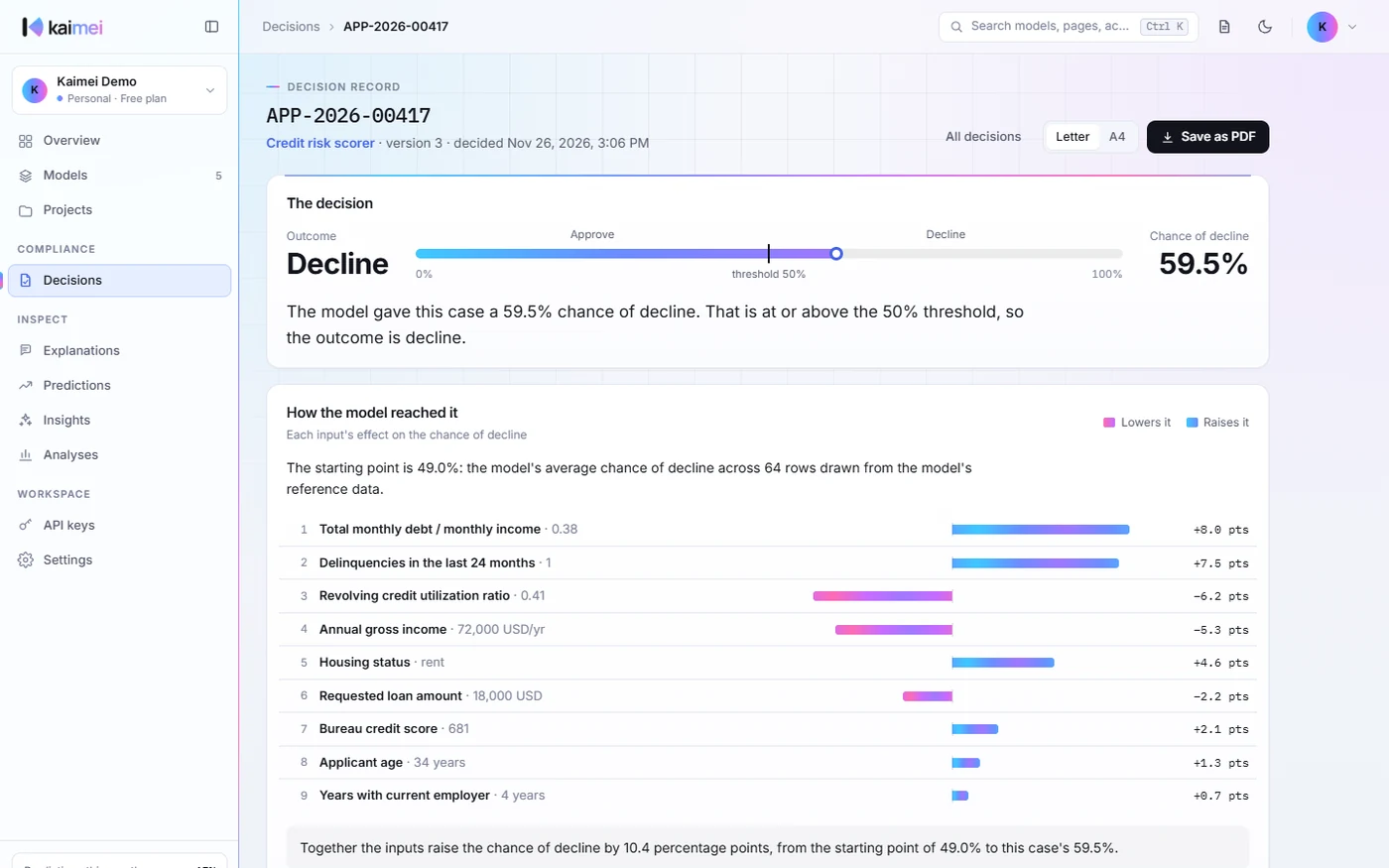
Every sentence is built from stored numbers, the same way each time, so the dashboard, the PDF and the API state the same thing. For the applicant above:
| Part | What it says | For this applicant |
|---|---|---|
| The decision | The model's number, the rule that turns it into an outcome, and the outcome. | The model gave this case a 59.5% chance of decline. That is at or above the 50% threshold, so the outcome is decline. |
| The starting point | What every effect is measured from: the model's average over the rows it was compared with. | The starting point is 49.0%: the model's average chance of decline across 64 rows drawn from the model's reference data. |
| Each input's effect | One line per input, strongest first, with its value and a sentence. | Total monthly debt / monthly income (0.38) raised the chance of decline by 8.0 percentage points. |
| The sum | That the effects add up to this case's number, when the method guarantees it. | Together the inputs raise the chance of decline by 10.4 percentage points, from the starting point of 49.0% to this case's 59.5%. |
| What would have changed the outcome | The smallest change the search found, and what was held fixed in it. | Changing bureau credit score from 681 to 850 would move the chance of decline from 59.5% to 8.3%, which makes the outcome approve. Held fixed in the search: applicant age. |
| Draft reasons | For a decision that went against the person, when the model has a reason table: your approved wording for the strongest pushes toward that outcome, and the inputs held for review. | 4 draft reasons for decline, strongest first. 2 inputs are held for review before these can be used. |
| Inputs as recorded | Every input the decision was logged with, digit for digit. | credit_score 681, debt_to_income 0.38, and the other seven. |
| How this was computed | The method, whether it can be reproduced and why, the seed, the rows compared with, the model version, and who asked. | KernelSHAP. The method was exact: every combination of inputs was evaluated, so the same model version and reference data give the same numbers every time. |
| What this record does not show | The limits in Reading an explanation: causation, fairness, the data's correctness, rules outside the model. | Printed on every record. |
A record also says what a reader must know before relying on it: that the decision is logged but not yet explained, that the outcome logged is not the one the model gave when it was explained, or that the explanation was computed on a different input from the one logged.
#Pictures, text and sequences
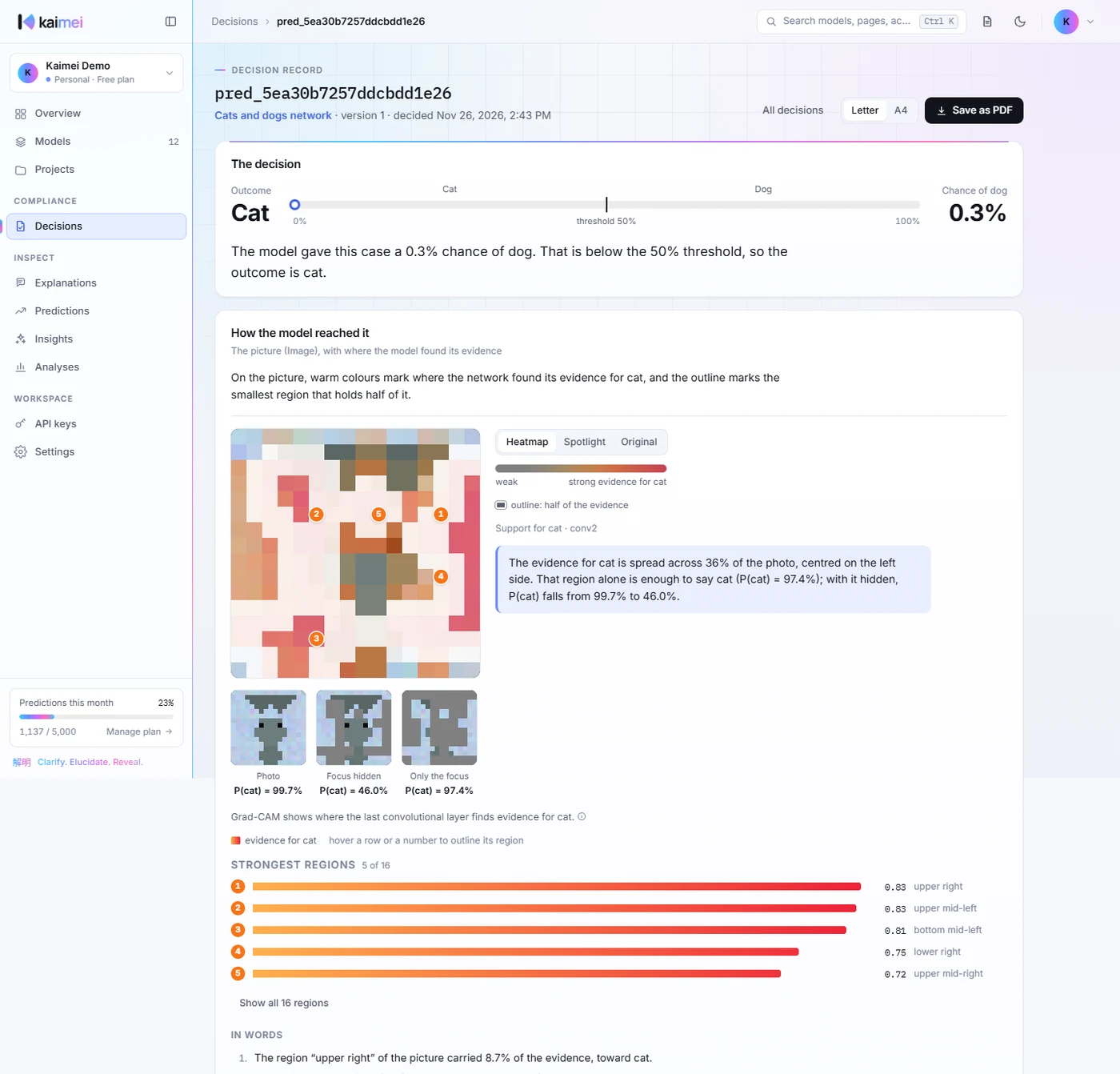
A model that reads a picture, a text or a series has no row of named inputs to list. Its record shows the input itself, with what the model was looking at drawn on it, and says the same in sentences. The dashboard draws it on the record; the PDF prints the same drawing.
| The model reads | The record shows | And says, for example |
|---|---|---|
| A picture | The picture beside the same picture with the model's evidence over it: warm colours for the answer, cool against it, and an outline round the smallest region that holds half of the evidence. Under it, the model's answer with that region hidden, and with only that region shown. | The evidence for cat is spread across 36% of the photo, centred on the left side. That region alone is enough to say cat (P(cat) = 97.4%); with it hidden, P(cat) falls from 99.7% to 46.0%. |
| A text | The text as the model read it, token by token, each token on the colour of its effect: one colour raised the answer, the other lowered it, stronger for a larger effect. | The token “skipped” (7 of 10) lowered the chance of positive by 99.9 percentage points: with it hidden, the model gives 99.9% instead of less than 0.1%. |
| A series | The series as a line, with a strip under it coloured by the effect of each step or stretch. | Step 47 (599.1 MW) lowered the predicted next hour load by 8.753 MW: with it hidden, the model gives 585.2 MW instead of 576.5 MW. |
| A prompt, for a language model | The prompt token by token, as for a text. The outcome is the next token the model found most likely. | The model's most likely next token is “felt”, with a 29.5% chance. The next most likely was “seemed”, at 25.2%. |
These effects are measured by hiding: a token is replaced by the model's unknown token, a step by the series' own average, a region of a picture by grey or by a blur, and the model is run again. The record says which, and says when the effects were each measured on their own and so do not add up to the prediction. An effect too small to print is said to be small, not given as a number.
A tensor or a recording is listed part by part, in words, without a drawing. A model that reads several inputs has each whole input's effect.
#What was decided, and the rules outside the model
A model's answer is one part of a decision. A cut-off turns its number into an outcome, an overlay rule may decide whatever the model says, and a person may review the case. Kaimei does not see any of that happen, so a record explains the model's part unless you record the rest beside it.
On a record, What was decided takes the outcome in your own word, and each rule: its kind, its name, whether it applied to this case, the rule in a sentence, its effect, and for a review who reviewed. A pipeline records the same through the API as it logs the decision. The record then states it, a sentence for each rule:
- The decision recorded for this case is “declined”. It was made by a person.
- Cut-off “Score cut-off” applied: Decline when the chance of decline is 50% or more. Its effect: declined.
- Overlay rule “Recent bankruptcy” was checked and did not apply.
- Manual review “Underwriter review”, by Senior underwriter: Upheld after checking the three reported delinquencies against the bureau file. Its effect: declined.
A rule can carry the reason to give the person when it, and not the model, decided against them. The record lists those apart from the draft reasons drawn from the model's explanation.
What is recorded can be amended, for instance when a review overturns the first outcome. The record shows the latest, with who recorded it and when, and the audit log keeps each amendment. The fingerprint does not cover it: the fingerprint is of the model's part, which never changes.
Stated as recorded Kaimei does not apply or check these rules. The record states them as they were recorded, and says so.
#Custody of a record
Each record ends with what has been done to it, from the audit log: who had it explained, who recorded or amended what was decided, and who placed or released a hold on it. A hold in force is shown with its reason and its matter number, and the PDF prints both. A record under a hold cannot be deleted.
#A decision that has not been explained
Logging a prediction stores its input and output. The effects are stored when the decision is explained, which can happen at the time or later, on request. A record of a decision that is logged and not explained shows the outcome and the inputs, and offers Explain this decision.
Explaining from the record uses the model and the input the decision was logged with. Nobody chooses either, so the explanation is of the decision on file. With no other instruction Kaimei uses KernelSHAP where the model allows it, with seed 0, reports every input, and searches for what would have changed the outcome. The record names who asked and when.
Recommended Explain a decision that affects a person when it is made, or soon after, while the reference data is the population the decision was made against. An explanation computed a year later compares the case with whatever reference data the model has then.
#The fingerprint
Each record carries a SHA-256 fingerprint, shown on the record, printed at the foot of every page of the PDF, and returned by the API. It is computed from the decision id, the model and its version, the logged input, output and time, and the explanation's method, options and numbers.
- It is the same every time the record is read, for as long as those stored facts are unchanged.
- It changes if any stored number changes, so a copy can be checked: read the record again and compare the two values.
- It does not change when a model is renamed or a sentence is reworded in a later release. Names and wording are not part of it.
- Each explanation has its own. A decision explained twice has two records, and the record shows the newest unless you choose the other.
The PDF carries no time of printing. One release of Kaimei gives the same file for the same record, whoever downloads it.
#Who can do what
Everyone in an organization can read a record and save it as a PDF. The reviewer role is for people who review decisions and build nothing: counsel, compliance, audit and model validation.
| Role | Read records, save PDFs | Explain a decision, record what was decided | Reason tables | Holds | Delete a record | Audit log | Change models, keys or settings |
|---|---|---|---|---|---|---|---|
| viewer | Yes | No | Read | Read | No | No | No |
| reviewer | Yes | Yes | Draft and approve | Place and release | No | Read | No |
| member | Yes | Yes | Draft | Place | Yes | No | Models and keys |
| admin, owner | Yes | Yes | Draft and approve | Place and release | Yes | Read | Yes, and the retention period |
An owner or admin invites someone as a reviewer, or changes a member's role, under Settings, Members. See organizations and roles.
#Doing it in code
For the engineers on your team. Log each decision under your own id when it is made; that id is all anyone needs later.
explain stores the explanation and returns the record. retrieve reads it back, months later, with the same fingerprint. save_pdf writes the document.
The API calls are in the Decisions reference.
# when the decision is made
client.predictions.create(
    model="credit-risk-v3",
    prediction_id="APP-2026-00417",        # your id for this application
    input=application,
    output=output,
)

# when someone asks why: explain it as it was logged
record = client.decisions.explain(
    "APP-2026-00417",
    options={"frozen_features": ["age"]},   # held fixed in the what-if search
)
print(record.outcome.sentence)
for factor in record.factors[:2]:
    print(factor.sentence)

# file it
client.decisions.save_pdf("APP-2026-00417", "records/")
print(record.fingerprint.value)The model gave this case a 59.5% chance of decline. That is at or above the 50% threshold, so the outcome is decline.
Total monthly debt / monthly income (0.38) raised the chance of decline by 8.0 percentage points.
Delinquencies in the last 24 months (1) raised the chance of decline by 7.5 percentage points.
7a79a3b2e04d5f63ab18c34be10963bf138f5ef023c0e710c1309c04cc546fea#What stays with you
- The decision itself. A record explains the model's part. Rules applied outside the model, such as cut-offs, overlays and manual reviews, are in it only when you record them, and then as you recorded them: Kaimei does not see or check them.
- What you tell the person. A record supplies the facts; the notice, its wording and its timing are yours. For credit, see Adverse action reasons.
- How long records are kept. Kaimei keeps them until you delete them, or for the retention period you set. Choosing the period is yours.
- Whether the decision was fair. A record is not a fairness test.